Montage
This is a collection of various UX challenges that I’ve worked on to showcase my ever developing UI/UX skills!
The Challenge
User Flows
Overview
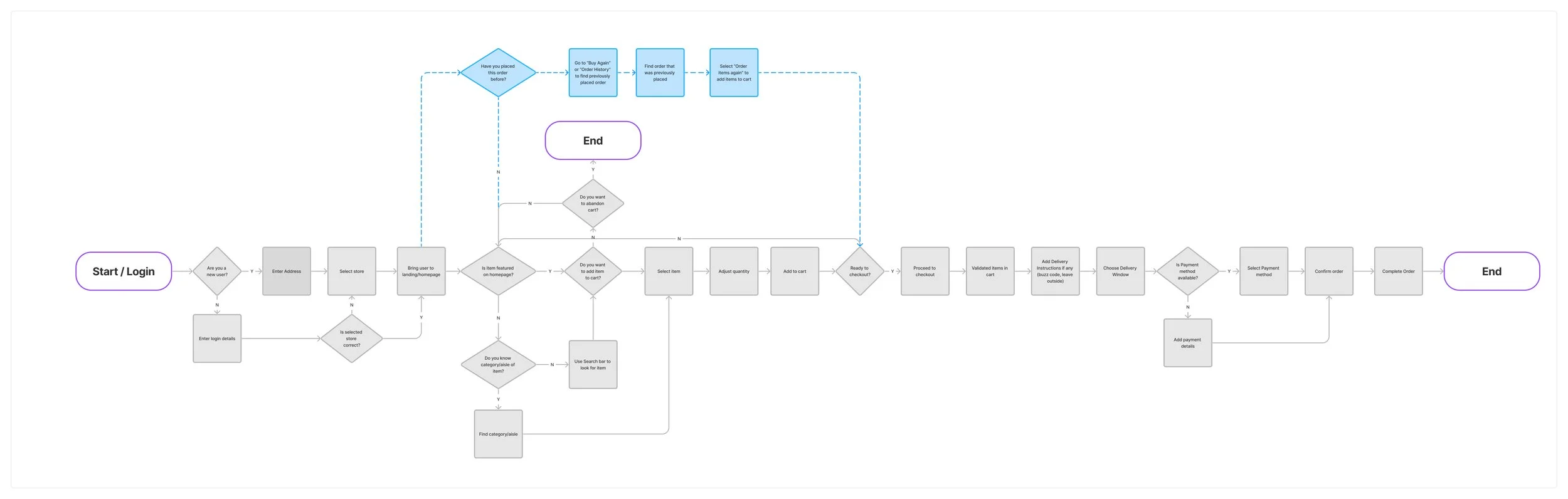
I am designing a new mobile grocery delivery app. It's the beginning stages of designing the app and I need to plan out the flow for how a user submits a delivery order.
Tools

The Process
The objective is for the user to be able to create an order from their selected store and submit an order for delivery.
Before creating a user flow, I considered what the ideal set of steps would be to accomplish the task, which would represent the happy path. I also considered that a user could also have an unhappy path where they abandon the cart altogether and not complete the order.
Next, I brainstormed questions and considerations for each activity.
Login/Store Selection
When logging into the app, is the user a new user?
Does the user have an existing account or will they need to set up an account?
As an existing user, is the store selection correct? Can they change the store selection?
Creating An Order
Featured items are usually available on the main page. Is the user looking for a featured item?
Can the user search for an item? How would they be able to search?
Does the user know what category the item is in if they choose to browse through the different sections?
At what point will a user abandon their cart and not complete the order?
Checkout and Delivery
Users should be able to select a delivery window.
Some users may have specific delivery instructions, similar to when users order food.
Can a user save payment details for future orders? What about discounts and coupons? Can those be applied?
Final User Flow
I kept the user flow high level, outlining just the basic steps to complete the tasks. Questions like applying and discounts are not reflected in this flow as I felt it would be too granular. Those types of questions would be things I would consider when sketching and designing the wireframes.
The Challenge
UX Whiteboarding
Overview
For this mini case study, I decided to try a UX Whiteboarding challenge. I gave myself one hour to go through the scenario.
Scenario
Design a tablet app that walks users through cooking a recipe in real time.
Note: Skip the onboarding and focus on the user using the recipe in real time.
Tools
The Process
In the hour that I had, my approach was to:
Ask questions to understand the problem and the context
Ask questions to understand the users
Document the main user flow
Sketch a few frames
Summarize and walk through the solution and suggest any other improvements or uses cases
What was the objective?
Before starting the challenge, I needed to understand what the problem was that I was trying to solve. What was the goal of the design?
The goal was to create a Tablet app that was user-friendly. It needed to provide a fun (and easy) cooking experience for someone at any skill level.
The Problem
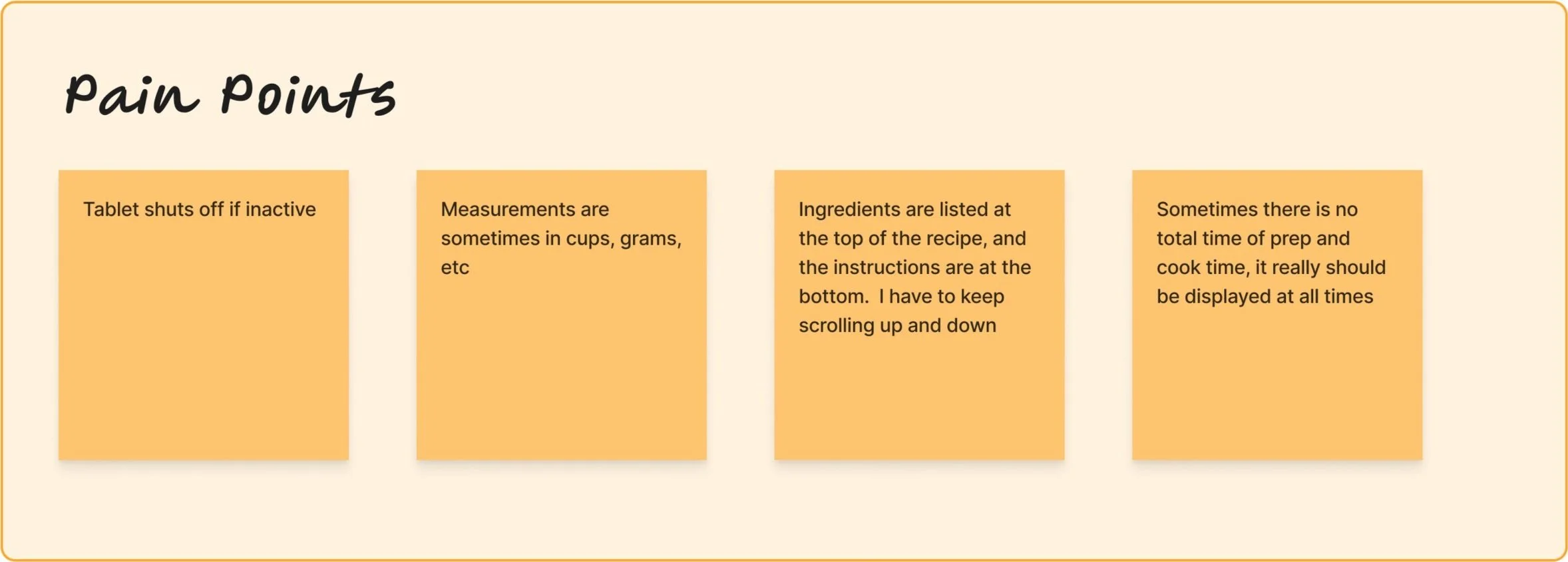
To understand the current experience now, some of the questions I proposed were:
What are your current challenges now following an online recipe?
Why would someone choose to follow a recipe in a book instead of an online recipe?
What frustrates you while following a recipe?
Understanding our Users
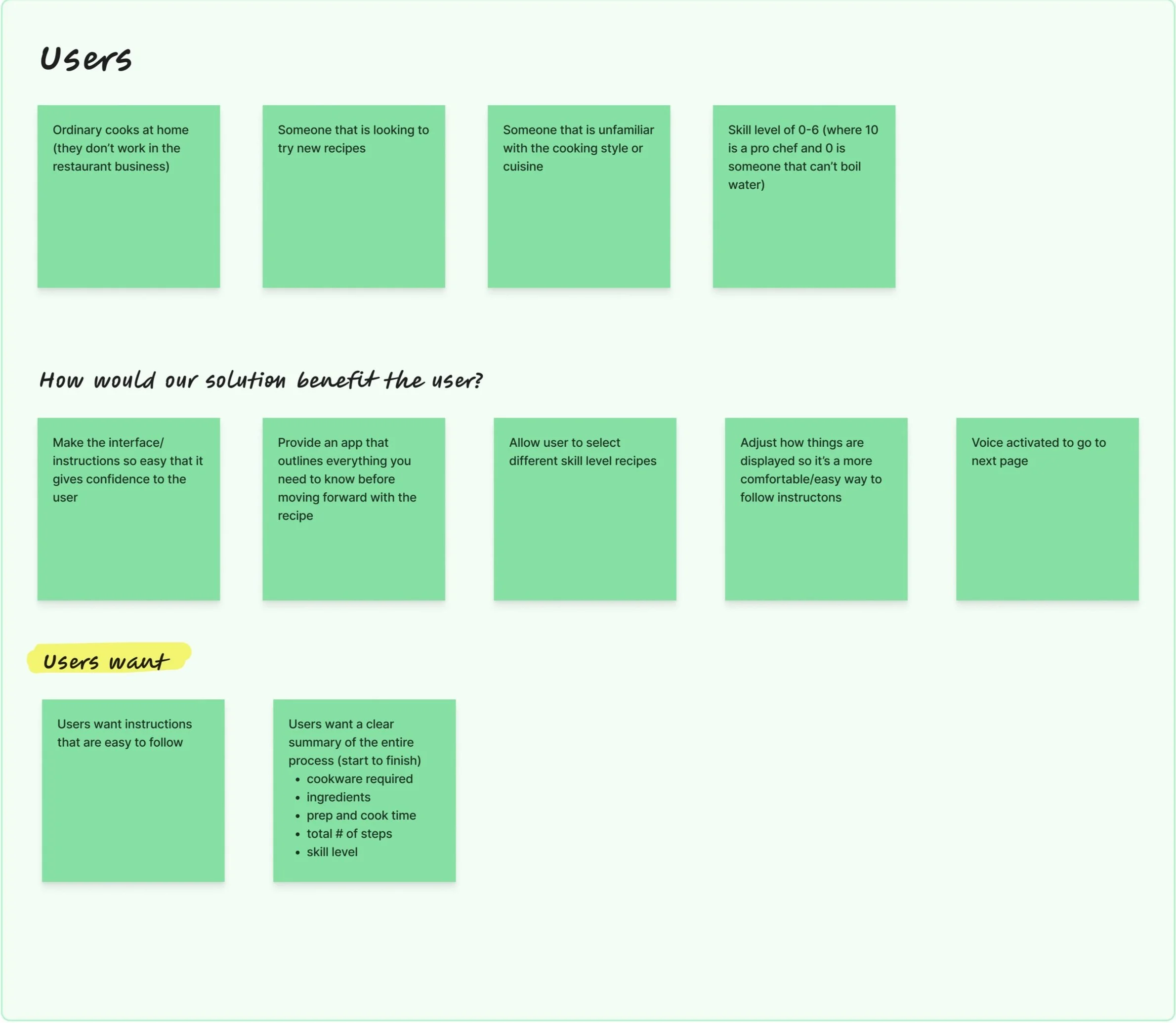
Users that will be using this application will be ordinary cooks at home. An edge case would be a cook in the industry using the app as a reference, but I will design this for an every day cook at home.
These every day cooks would range in skill level - probably between 0 to 7 (where 0 is someone that cannot boil water and 10 is someone that can manage themselves in a professional kitchen). These users are looking to try new recipes, or a new cooking style, or a cuisine they are not familiar with.
What these users will want is an app that provides very simple, easy to follow instructions, but also something that gives them an overall summary of the entire process (from cookware, to ingredients, to number of steps).
User Flow
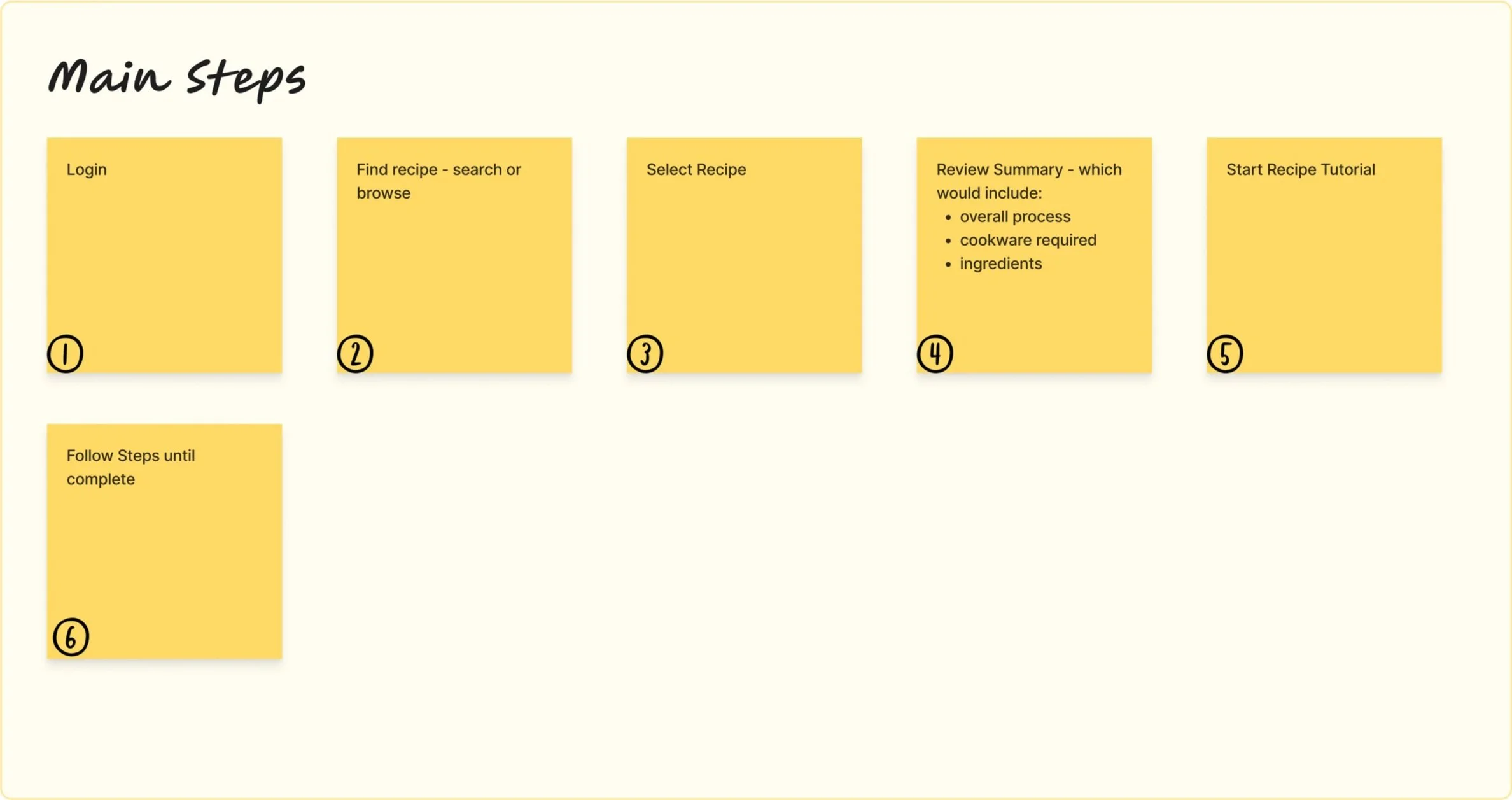
I documented what the main actions would be in the app
Sketches
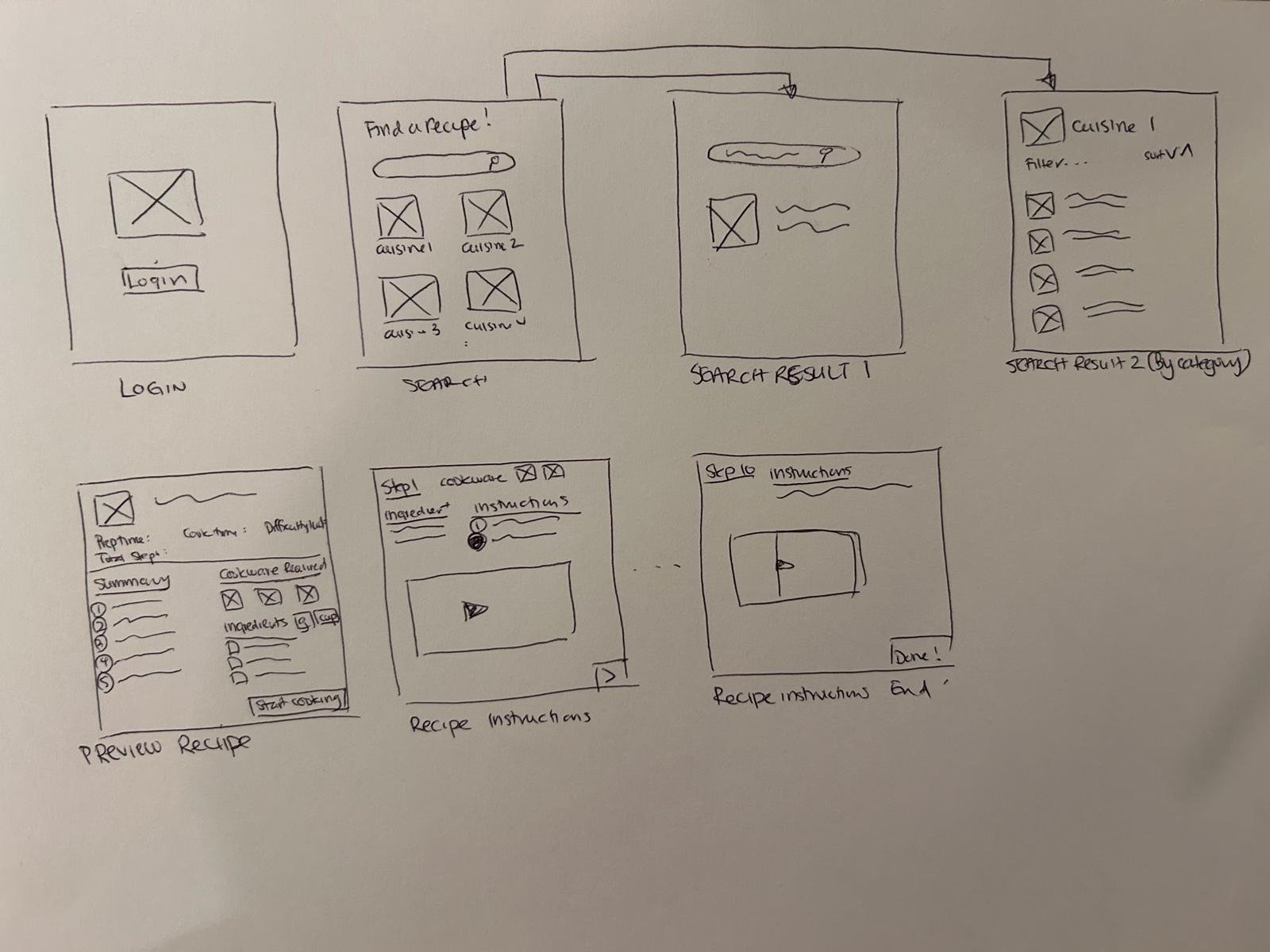
Next Steps and Final Thoughts
Based on the exercise, there are a few features I would also add to this design:
Depending on the skill level, the user can modify how they want the pages to be displayed. The user can opt out of seeing the videos if needed.
Incorporate voice activation where the App will allow user to proceed to next page/step using Siri or Alexa.
When filtering for recipes, the recipe source should be included. For example, was the recipe provided by a trained chef?
Users should be able to favourite the recipes they enjoyed so they can easily go back to them.
Users should be able to make notes on the recipes they’ve saved or favourited under their profile